HTML5 Project: WIREFRAME SERIES #1 – HOME PAGE

Read the entire “Wirefame Series” Intro» Page 1» Page 2» Page 3»
This is the first in a series of articles reviewing the wireframes for my HTML5 project, which is designing my web design & development online portfolio using pure HTML5 (see the article announcing the series). This was the toughest page to lay out: I had multiple page elements that needed to be positioned exactly to the current HTML5 specification, which will now be referred to as the spec.
(Important: I’ll be sending the final site to HTML5 Doctor and/or HTML5 Gallery for review when it’s done. While I’m confident that my site conforms to the HTML5 specification, these guys may say it doesn’t. Please keep that in mind when reading this.)
This article is structured as follows:
- Wireframe Review
- HTML5′s
<header>and<footer>tags - HTML5′s
<article>and<section>tags - All the older tags and their usage
- The
<small>tag - Summary
Wireframe Review
First, let’s look at the home page:

Now, let’s break it all down…
There are three navigation elements, each appearing on every page of the site:
- The main navigation at the top of the page in the tag

- The spec calls for only one on the page. As this is the main navigation, this where is going. role=”navigation” just makes the navigation more accessible to wider array of devices.
- The tag directly below the main navigation which contain links to my Facebook, Twitter and blog pages

- The spec calls for the tag to only contain links that go to pages within the site. Since both the Facebook and Twitter links leave the site, they need to be placed outside of and into a .
This portfolio will mostly likely live in a sub-domain: something like “work.kaidez.com.” This blog link goes to this site’s home page so when you click it, you go from “work.kaidez.com” to “kaidez.com.” Since it’s not going to page within the current site but still stays within the primary domain, I wasn’t sure if it should go in the tag.
I asked HTML5 Doctor about this and they said that it’s okay to put the blog link into , but I’m opting to put it with the social networking stuff. I may end up putting it back into at the end of the day though.
-
A reappearance of the main navigation in a tag in the tag at the bottom of the page

-
Again, the spec allows for only one tag per page. Since a tag already exists, putting these links in the as I did here seems to be the way to go.
HTML5′s header & footer Tags
You guessed it right. should go at the very top of the page and contain header content…
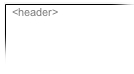
while footer should go at the very bottom of the page and contain footer content.
![Footer Snippet for kaidez portfolio site][24]
HTML5′s article and section tags
Almost all unique page content goes into either one or both of these tags, making them the two most exciting and most confusing aspects of HTML5 in terms of how the spec tells us to use them.
First, let’s see what what HTML5 Doctor has to say about this:
There’s been a lot of confusion over the difference (or perceived lack of a difference) between the and elements in HTML5. The element is a specialised kind of ; it has a more specific semantic meaning than in that it is an independent, self-contained block of related content. We could use , but using gives more semantic meaning to the content. By contrast is only a block of related content, and is only a block of content…To decide which of these three elements is appropriate, choose the first suitable option:
- Would the content would make sense on its own in a feed reader? If so use
<article> .
- Is the content related? If so use
<section>.
- Finally if there’s no semantic relationship use
<div>.
So…
I want to display four different samples of my work on the home page. Since I believe all my work is related on some level, I’m putting all of it into a tag.
I think each sample would make sense on its own in a feed reader if needed, so I’m putting each one in their own individual tag.
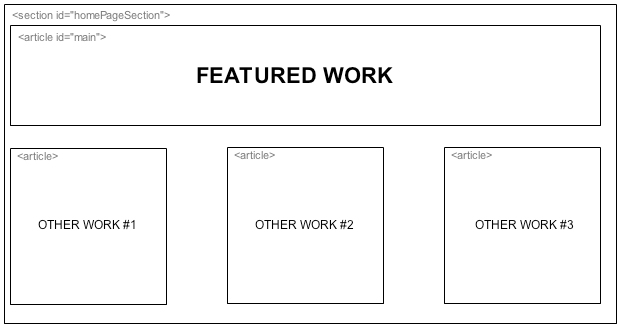
HTML5 Doctor may shoot this down when the time comes, but I think I did this right.
All the older div tags and their usage
The two organizations overseeing the creation of the HTML5 spec, W3C and WHATWG, want you to use the <div> tag as little as possible and, instead, use one of the newer tags. But they’re fine with you using <div> if it’s your only option.
With the social networking and blog links I discussed above, was my only option. Let’s look at some other tags on the home page:
- **The Container **
It’s common practice to wrap every single solitary page element into a single tag, usually with an ID of either “container” or “wrapper” (I used “container”). This has not changed…you should always do this for an HTML5 page. **The Page Content **
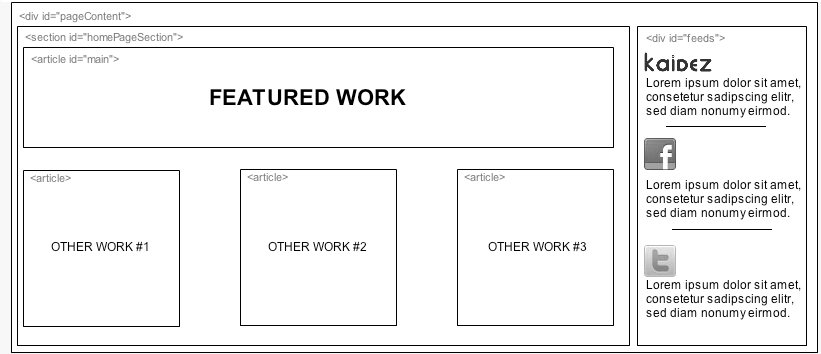
I used this to neatly contain both the tag that contains all my work and another tag with an ID called called “feeds”.
Why is the “feeds” content in a instead of or ? Let’s talk about it…
**The Feeds **
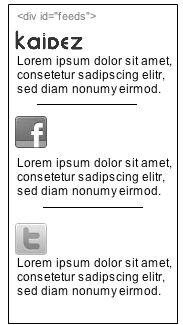
I’d want to display RSS feeds of my most recent, Facebook, Twitter and blog posts on the home page and I want them above the fold. I guess I could put them in either an or tag, but let’s go back and review what HTML5 Doctor told us earlier:
- Would the content would make sense on its own in a feed reader? If so use
- Is the content related? If so use
- Finally if there’s no semantic relationship use
So…
- These Facebook, Twitter and blog posts are already in a feed. Having them stand alone in another feed seems repetitive to me so I think this cancels out #1.
- The content being displayed here are snippets from my blog and the social networking world. I don’t think they’re really related so I think this cancels out #2.
- With #1 and #2 canceled out, I’m going with #3.
The small Tag
In terms of how this tag renders text, there’s nothing new here. But in terms of how to use it as per the spec, there’s a difference.
The tag does exactly as it implies: it makes text smaller. In HTML 4.01, you could use it whenever and wherever you wanted.
But according to the spec, should only appear in an HTML5 page if it’s applied to small print…things like legal disclaimers and, in this case, copyrights.
Summary
As you can see, HTML5 is very big on semantics. The spec has many rules, regulations and best practices to follow when it comes to setting up the page tags. HTML5 Doctor does a great job of taking the somewhat verbose HTML5 spec and translating it into easy-to-understand terms, so they should be your first stop in understanding HTML5 as a whole.
A major major characteristic of HTML5 has to do with how all the page content relates to one another. I briefly discussed this in the and paragraphs above, but the tag plays a big role here as well. This will be discussed in my next article (again, no pun intended).
| ***Read the entire “Wirefame Series”: Intro» | Page 1» | Page 2» | Page 3»*** |